Less is more
 Some time ago I've posted a couple of ideas around productivity and distractionless computer environment. Since then I continue trying to optimize my computer experience here and there.
It is always interesting to know what ideas others have about problems you are thinking about. So it was very interesting for me to read how Leo Babauta of Zen Habits approaches his computer experience. A lot of good ideas there.
Some time ago I've posted a couple of ideas around productivity and distractionless computer environment. Since then I continue trying to optimize my computer experience here and there.
It is always interesting to know what ideas others have about problems you are thinking about. So it was very interesting for me to read how Leo Babauta of Zen Habits approaches his computer experience. A lot of good ideas there.
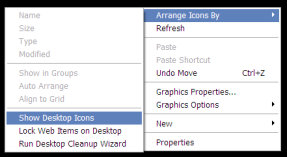
Iconless desktop. Great idea! Desktop is not a junkyard. On Windows XP it is as simple as right-click on the desktop -> Arrange Icons By -> Show Desktop Icons.
"Light" menubar. Now I switched from autohiding my Task Bar to completely removing it from the screen: only 2 pixels at the top of the screen. No more annoying appearances of the Tool Bar when your mouse is near the edge. You can still use Win-key to access the Start menu and Alt-Tab to switch between windows.
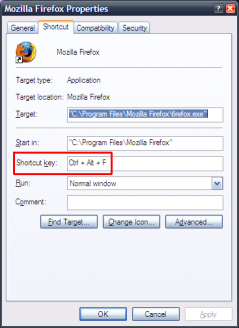
Keyboard shortcuts instead of icons. Brilliant! This is something that I started adopting very actively. On Windows XP you do not even need to install additional software tools: right-click on the icon in the Start Menu -> Properties, click in the Shortcut key box and select shortcut for an application.
Find your way to effective computer experience.These and other small tricks can take you one step away from chaos and give you some precious time to do what you do best - create!